- DATE:
- AUTHOR:
- Toast product communications
Links

Identify offline devices holding autofire orders with specific device names
When an autofire device goes offline, other Toast POS devices at the location now display an offline warning banner on the Payment Terminal and Orders Hub screens containing the name of the specific device that's offline (for example, "Terminal 2 - Patio Bar is offline"). This helps you quickly identify the disconnected device, so you can restore the connection and process scheduled orders.
Here is the Orders Hub screen on a Toast POS device showing a warning banner containing the name of the autofire device (Expo Station) that's offline at that location.
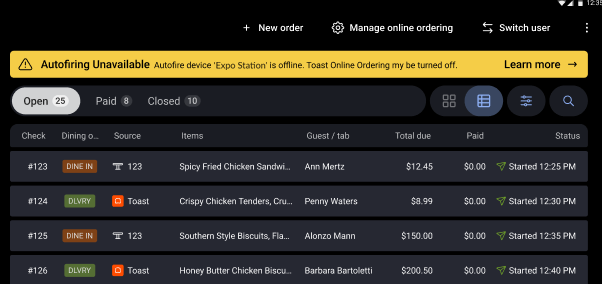
Autofire devices that are offline still display the standard offline warning banner.
For more information about offline mode, see this Toast Support article.
Availability
First available in Toast POS version 2.109.
Countries affected
All
Links